Understanding strong vs bold and emphasis vs italic
Doppelgängers in code: How tags that look the same carry different meaning
Overview
Despite appearing in the HTML 2.0 spec back in 1995, the accessibility purpose of <strong> and <em> tags remains widely misunderstood.
Part of the confusion comes from their respective doppelgängers: <b> and <i>, which have been part of HTML since the beginning.
At a glance, both pairs look identical. <strong> and <b> render as bold text, while <em> and <i> appear italicized.
But beneath the surface, they convey something very different.
Understanding Bold and Italic: HTML, CSS, and Screen Readers
There are a few ways to make text bold or italic on a page.
For bold:
<!-- Presentational HTML -->
<b>bold tag bolded text</b>

<!-- CSS styling -->
<p style="font-weight: bold;">CSS font-weight bolded text</p>

<!-- Semantic -->
<strong>strong tag bolded text</strong>
For italic:
<!-- Presentational HTML -->
<i>italic tag italicized text</i>

<!-- CSS styling -->
<p style="font-style: italic;">CSS font-style italicized text</p>

<!-- Semantic -->
<em>emphasis tag emphasized text</em>
To an everyday user, all of these will result in text that looks the same. Even present day screen readers often treat these similarly, and may announce them as "bold" or "italic" or sometimes not at all, depending on the user’s settings and screen reader.
This might leave you wondering: if screen readers treat all of these the same, does using <strong> or <em> actually matter?
It’s a fair question and the answer is a bit more nuanced than it might seem. In practice, <strong> and <em> may not carry as much impact as larger structural elements like <header> or <main>, but they still provide meaningful semantic value.
To understand why, we need to look beyond what’s visually rendered and into the way browsers expose accessibility meaning behind the scenes.
Inside the Accessibility Tree: What’s Really Happening
The accessibility tree is a simplified version of the DOM that contains only what assistive technologies actually use.
Instead of everything in the DOM, it focuses on elements’ roles, states, names, descriptions, and values.
It’s here that we can see the real differences between <strong> and <b>, and <em> and <i>.
Let’s take our code from before and add a little more structure to it:
<h2>Bolds</h2>
<ul>
  <li>
    <b>bold tag bolded text</b>
  </li>
  <li style="font-weight: bold;">
    CSS font-weight bolded text
  </li>
  <li>
    <strong>strong tag bolded text</strong>
  </li>
</ul>
<h2>Italics</h2>
<ul>
  <li>
    <i>italic tag italicized text</i>
  </li>
  <li style="font-style: italic;">
    CSS font-style italicized text
  </li>
  <li>
    <em>emphasis tag emphasized text</em>
  </li>
</ul>
We can open this in Firefox. Most browsers let you inspect parts of the accessibility tree, but at the time of writing, Firefox is the only one that exposes it in full. You can access it by right-clicking and selecting "Inspect Accessibility Properties".
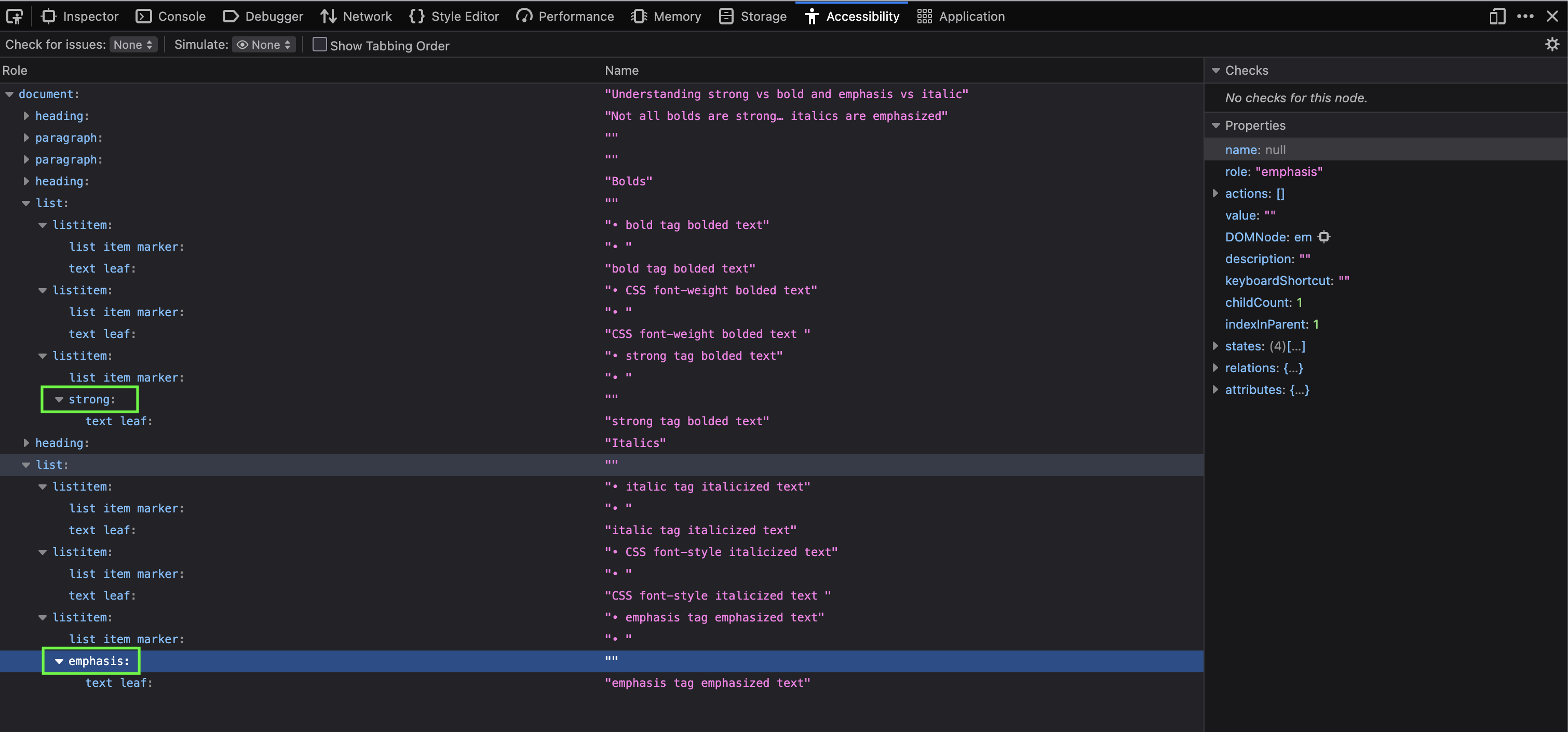
On the left, you’ll see each element’s role. On the right, its associated properties, such as value.
If we expand the list items, something interesting appears: the entries using <strong> and <em> aren’t just text nodes, they carry additional semantic distinctions that the browser exposes to assistive technologies.
The visually identical <b>, <i>, and CSS-styled text? They don’t.
In other words, the browser is exposing these as emphasis and importance, not just styling.
So if that meaning exists under the hood, but present-day screen readers don’t consistently make use of it, where does the real value of <strong> and <em> come from?
The Future of Screen Readers: AI and Smarter Tag Annunciation
We’ve seen that this semantic information exists in the accessibility tree, even if present-day screen readers don’t fully use it.
So what happens when they do?
Recent advances in AI have dramatically improved how natural and expressive synthesized speech can be. Instead of simply reading text aloud, modern systems are becoming better at conveying tone, emphasis, and intent.
This is where elements like <strong> and <em> start to matter more.
Today, many screen readers treat bold and italic text similarly, regardless of how that styling was applied. But in a future where speech output becomes more nuanced, these semantic signals could influence how something is spoken, not just what is spoken.
A phrase wrapped in <em> might carry subtle vocal emphasis. Text marked with <strong> might be delivered with greater weight or urgency.
In that sense, using semantic HTML isn’t just about improving accessibility today, it’s about preparing your content for more expressive, meaning-aware interfaces in the future.
You’re not just styling text.
You’re encoding intent.
Wrap up
Despite <strong> and <em> being around since the mid 90s, screen readers have yet to consistently convey them in a meaningful way.
However that could be changing, and quickly, with advancements in AI.
Entire music tracks, vocals and all, are being generated by AI. Deepfake videos rule the web (for better or worse). No longer do text-to-speech editors require fiddling with input to get the desired effect (like trying to make Microsoft Sam to sound like a helicopter).
Using these semantic tags now future proofs your content for when technology catches up to fulfill the promise of an accessible web.